




What Models Does Chevrolet Super Cruise Come With and How Do I Use It?
Many automobile manufacturers have been researching fully and semi-autonomous driving technology, but some forms prove more practical or enjoyable than others. The Chevrolet Super Cruise driver assistance technology provides a hands-free or hands-on form of partially autonomous driving on compatible highways. This tutorial will help you learn more about Chevrolet Super Cruise. View our inventory of New Chevrolets, or If you have any questions, give us a call at 931-548-1370 today!
What’s Super Cruise and Which Models Have It?
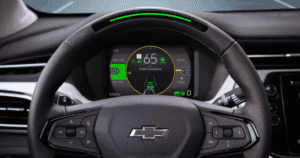
Chevrolet Super Cruise
Super Cruise is a driver assistance technology included as standard on many new Chevy vehicles, available on many highways throughout North America. The device guides your vehicle automatically to maintain lane position and following distance and allows you to steer manually.
This mode decreases the need to brake, accelerate, or even steer, creating a semi-autonomous break during daily commutes or work travels around Columbia. Chevrolet has made Super Cruise hands-free driver assistance technology available on the 2022 and 2023 Bolt electric utility vehicle, 2022 and 2023 Silverado, 2023 Silverado LD, 2024 Silverado electric vehicle (EV), 2023 Tahoe, 2023 Suburban, 2024 Blazer EV, and 2024 Equinox EV, and it’ll likely appear on future vehicles as well.
How Does Super Cruise Work?
Super Cruise uses GPS sensing and enhanced navigation data to identify your car’s location, while the lane sensing camera recognizes the lanes for automatic steering. It also activates the driver attention system, monitoring your head position to ensure you focus on the road. Various parking and guidance cameras help sense vehicles ahead, behind, and around your Chevy.
The system also uses the adaptive cruise control function, which is usable by itself if you wish. Adaptive cruise Control detects automobiles driving in the same direction and maintains your following distance. It can brake to slow your speed or even stop, making it handy for stop-and-go traffic.
How To Turn Super Cruise On
Once on a supported road, the exact way to control the system will vary, depending on which Chevy model year you have. What matters most is positioning your vehicle in the middle of your lane. Keep your eyes on the road and hold the steering wheel steady until you see the green steering wheel light bar indicator, and then you press the Super Cruise button and take your hands off the wheel.
The system will check that you’re paying appropriate attention to the road ahead, that the lane markings are visible, that GPS is available, and other details all at once. If everything is okay, the Super Cruise badge will appear on the instrument cluster and the green light bar, and you can press the corresponding button.
How To Turn Super Cruise Off
Once Super Cruise has assumed charge of driving, you can remove your hands from the steering wheel. You can still steer your vehicle manually at any time, but that won’t turn the mode off. To turn off Super Cruise, put your hands on the steering wheel and then either push the brake, the Regen on Demand button (for Chevrolet EVs), or the Super Cruise button. Don’t try to exit Super Cruise mode without holding onto the wheel first.
Super Cruise will re-activate the enhanced automatic emergency braking, forward collision alert, and lane change with side blind zone alert, even if you previously disengaged them, as they’re fundamental to that feature. Switching Super Cruise off will return those functions to your previously established settings, so if you had set the lane change alert to off, it’d remain off once Super Cruise deactivates.
What Does the Steering Wheel Light Bar Mean?
The steering wheel light bar communicates the status of the automatic safety and cruising systems. A quick overview is as follows:
- No light: No Super Cruise or adaptive cruise feature is active, and you need to accelerate, brake, and steer on your own.
- Solid green: Super Cruise is active and automatically steering.
- Flashing green: Super Cruise is active, but your driver attention monitor detects that you aren’t looking at the road.
- Flashing red: You need to take control of the steering. This can appear without using Super Cruise, but it’ll deactivate if it happens when activated. You’ll need to re-steer to the center and manually turn the system back on.
- Pulsing blue: Super Cruise is active, and you’re manually holding and using the steering wheel.
If you want to engage Super Cruise steering fully after seeing a blue light, position your vehicle in the center of the lane. Once you see a green indicator, press the Super Cruise button, and release the wheel. Finally, if you ever see a flashing red bar while also hearing beeping noises or voice prompts, you may be facing an imminent crash and must steer and brake immediately.
When Should You Not Use Super Cruise?
While Super Cruise can help reduce driver fatigue and increase comfort, it must be used responsibly. Even on proper roads and with the correct technique, you shouldn’t use Super Cruise in the following situations:
- When you aren’t on a clearly divided and suitable roadway with opposing traffic.
- When driving in difficult or uncertain conditions, including hazardous weather.
- When lane markers are inadequate, or visibility is poor.
- In tunnels or construction areas.
- On the road shoulder or a service road.
- When pulling a caravan or trailer.
- In an exit lane.
Hands-free driving is illegal in some jurisdictions, so learning the local laws of any place you intend to bring your Super Cruise-equipped Chevy is critical. If hands-free driving isn’t allowed, you can still use all the system’s other benefits while keeping your hands on the wheel.
We also recommend booking service for your Chevy if it’s about time to do so. This way, your vehicle and its active safety features are guaranteed to work well, and you can get any further Super Cruise questions answered.
Want to Experience Super Cruise?
If you’re searching for a vehicle with the latest hands-free driving technology, stop by our dealership or browse online. At Stan McNabb Chevrolet of Columbia, our professionals want to help you choose the best car, truck, or SUV. If you’d like to learn more about the Super Cruise system or take a test drive in one of our new Chevy vehicles, explore our inventory now.
0 comment(s) so far on What Models Does Chevrolet Super Cruise Come With and How Do I Use It?